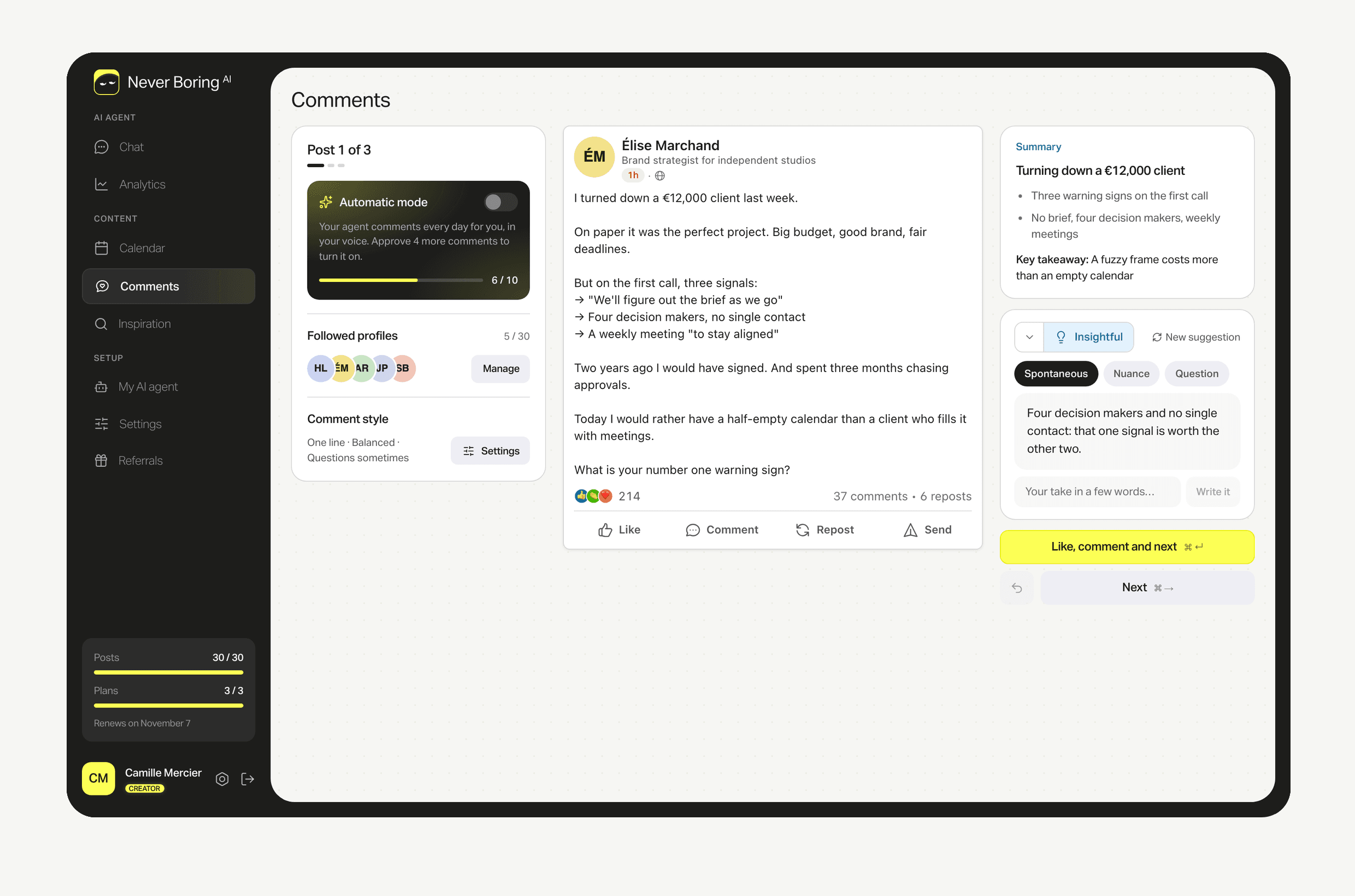
A good LinkedIn comment adds an idea, an experience or a sharp question to someone else's post, under your name, in front of their audience. Never Boring AI drafts it for you: pick up to 30 profiles, and their new posts land every day with a comment suggested in your voice. You read, tweak, approve. Goodbye to “Great post!” on autopilot.
Paste a LinkedIn profile address to follow it, up to 30. Clients, prospects, peers: their new posts arrive on the page every day, one at a time, without you opening your feed.
Your style
Comments that sound like you
Length, stance, questions to the author, tone of address, emojis, humour, and what you would never say: you set your style once. The agent sticks to it, on top of the voice it already knows from your posts.
You stay in control
Nothing goes out without you
Every comment is a suggestion. You read it, rewrite it if needed, and it only leaves your LinkedIn account once approved.
Three angles per post
Spontaneous, nuanced or a question: up to three suggestions, and you can give your take in a few words.
A human pace
10 comments a day on weekdays, sent during the day, a few minutes after you approve.
The post summary
The gist of the post in a few lines, so you comment knowingly without rereading it all.
The method
How to comment on LinkedIn to get noticed
Commenting on the right people's posts is one of the most direct ways to get known on LinkedIn: your name shows up in front of their audience, and the author notices you. It costs you no content of your own, only attention. Here is the method to do it every day without losing your morning to it.
1
Choose the profiles that matter
Do not comment at random as you scroll. Draw up a short list: clients you want to keep, prospects you want to approach, peers whose audience looks like yours. Thirty profiles at most are enough to show up every week without spreading yourself thin. Their new posts then arrive on a single page, without you having to look for them. Review the list once a month: drop the profiles that no longer post, and add the people you met or worked with recently.
Followed profiles
8 clients, 12 prospects, 10 peers writing for the same audience as you.
2
Read the post before replying
A good comment proves you read. Spot the central idea of the post, what the author is defending, and the question they leave open. The summary provided for each post helps you comment knowing what it is about, but it does not replace your view: that is what makes a comment interesting. When a post touches something you know well, open it in full on LinkedIn before replying: the comments already there tell you what has been said and what is still missing.
Post summary
She argues that an overly detailed quote loses clients, and asks who has seen it happen.
3
Add something
A comment that only agrees serves neither the author nor you. Bring a number, an experience, a nuance or a specific question: two to four sentences are enough. Pick the angle that suits you among the three suggested (spontaneous, nuanced or as a question), and rewrite the suggestion freely before approving it. Disagreeing politely is allowed and often remembered: a well argued nuance starts more conversations than one more “so true”.
Comment
Same thing with my clients: since I give a price range before the quote, half the conversations wrap up in one call. Do you give a price at the first meeting?
4
Keep a human pace
Consistency counts more than quantity. A few comments a day, on weekdays and during the day, build a credible presence. Dozens of comments in a burst look like a bot, and both the author and their readers can tell. Never Boring AI sticks to ten a day on weekdays, and to one per profile per day. LinkedIn's Help Center says it too: when it detects excessive comment creation, it may limit the visibility of those comments. Spread over a month, that is still a steady stream of thoughtful comments, which is more than most people manage to keep up by hand.
Pace
10 comments a day, Monday to Friday, none at the weekend.
The pitfalls
Comments that do nothing for you
They take time, and leave no trace in the mind of the author or their readers. Most of them come from good intentions and a rushed morning, which is exactly why they are worth recognising.
The approval comment
Avoid
Great post, thanks for sharing!
Instead
I tried the opposite last year: two clients lost in a month. Your approach is closer to the truth.
A generic comment drowns among the others, and gives no reason to click on your profile. The smallest concrete contribution changes everything: the author replies, and their readers see that you know what you are talking about. Even a question about a detail of the post counts, as long as it shows you read it.
The disguised ad
Avoid
Very interesting! That is exactly what my offer does, I will send you the link.
Instead
A reply that shows your expertise, without a word about your offer.
Selling yourself in someone else's comments is the surest way to be ignored. Your profile does the promotion for you: if the comment is sharp, curious readers will go and see who you are. If the author or a reader asks about your work in the replies, answer then: the conversation has invited it.
The generated comment, posted unread
Avoid
An excellent reflection that sheds light on the essential challenges of our time.
Instead
A comment suggested in your voice, which you read, edit and approve yourself.
Comments produced in bulk give themselves away with their smooth tone and empty phrases. A suggestion is only a starting point: nothing goes out from your account without your approval, and automatic mode only opens after ten comments approved by hand.
Commenting on everyone, once
Avoid
Fifty profiles commented on once, then nothing.
Instead
The same profiles, commented on regularly, week after week.
A relationship is built through repetition. The author ends up recognising your name, then replying to you, then visiting your profile. Thirty profiles followed regularly are worth more than a hundred commented on at random. Following the same profiles also means you understand their topics better each week, so your comments get sharper over time.
Rated 5/5 by its users
264 founders have already trusted Never Boring.
Translated from French.
Jonah ZehaniBrand, web and product designer
First off, congratulations Maxence. The work you did solo, and above all the quality of the app's design. That is something. Well done. (...)
Looking forward to seeing NeverBoring grow
FLFlorenceNever Boring AI user
A very efficient and relevant agent: barely any time spent setting it up. Quality posts with different angles. There are always a few tweaks left to match my style, and then it is good to go!
Louis MontagneFounder and CEO, ICONOKOM
Very cool so far, inteliigent post writing
GUGuillaumeNever Boring AI user
Great tool, smart agent!
An innovation in writing!
Will MariWeb designer
Super easy to use
Jonah ZehaniBrand, web and product designer
First off, congratulations Maxence. The work you did solo, and above all the quality of the app's design. That is something. Well done. (...)
Looking forward to seeing NeverBoring grow
Louis MontagneFounder and CEO, ICONOKOM
Very cool so far, inteliigent post writing
FLFlorenceNever Boring AI user
A very efficient and relevant agent: barely any time spent setting it up. Quality posts with different angles. There are always a few tweaks left to match my style, and then it is good to go!
Will MariWeb designer
Super easy to use
GUGuillaumeNever Boring AI user
Great tool, smart agent!
An innovation in writing!
GUGuillaumeNever Boring AI user
Great tool, smart agent!
An innovation in writing!
Will MariWeb designer
Super easy to use
Jonah ZehaniBrand, web and product designer
First off, congratulations Maxence. The work you did solo, and above all the quality of the app's design. That is something. Well done. (...)
Looking forward to seeing NeverBoring grow
FLFlorenceNever Boring AI user
A very efficient and relevant agent: barely any time spent setting it up. Quality posts with different angles. There are always a few tweaks left to match my style, and then it is good to go!
Louis MontagneFounder and CEO, ICONOKOM
Very cool so far, inteliigent post writing
FLFlorenceNever Boring AI user
A very efficient and relevant agent: barely any time spent setting it up. Quality posts with different angles. There are always a few tweaks left to match my style, and then it is good to go!
GUGuillaumeNever Boring AI user
Great tool, smart agent!
An innovation in writing!
Louis MontagneFounder and CEO, ICONOKOM
Very cool so far, inteliigent post writing
Will MariWeb designer
Super easy to use
Jonah ZehaniBrand, web and product designer
First off, congratulations Maxence. The work you did solo, and above all the quality of the app's design. That is something. Well done. (...)
Looking forward to seeing NeverBoring grow
FLFlorenceNever Boring AI user
A very efficient and relevant agent: barely any time spent setting it up. Quality posts with different angles. There are always a few tweaks left to match my style, and then it is good to go!
GUGuillaumeNever Boring AI user
Great tool, smart agent!
An innovation in writing!
Louis MontagneFounder and CEO, ICONOKOM
Very cool so far, inteliigent post writing
Will MariWeb designer
Super easy to use
Jonah ZehaniBrand, web and product designer
First off, congratulations Maxence. The work you did solo, and above all the quality of the app's design. That is something. Well done. (...)
Looking forward to seeing NeverBoring grow
A question before you start?
The questions that keep coming up about linkedin comments, and how we answer them.
Click Comment below the post, type your text, then click Comment again to post it. LinkedIn's Help Center adds that you can type @ to mention someone and add an emoji, a GIF or an image. On mobile, the steps are the same. Authors can turn comments off or limit them to their connections, in which case you cannot comment on that post.
Yes, under the post, but not always at the top. LinkedIn sorts comments by Most relevant or Most recent, and its Help Center notes that some comments only show up in the Most recent view. It also says it may limit the visibility of comments when it detects excessive comment creation or the use of an automation tool.
Yes: replying is a standard LinkedIn feature. Click Reply below a comment, type your answer and post it. When you comment on your own post, LinkedIn shows an Author tag next to your name, so readers see the author is part of the conversation. The Never Boring AI Comments page, for its part, drafts comments on the posts of the profiles you follow.
Never Boring AI, if you want to comment on the profiles that matter without writing everything yourself. You follow up to 30 profiles; every day, their new posts arrive with a suggested reaction and up to three comment drafts, written in the voice the agent knows from your posts. Nothing goes out until you approve it, and the automatic mode only opens after ten comments approved by hand.
LinkedIn's Help Center gives no number: it only warns that it may limit how many comments a member can make in a certain time period. Never Boring AI sticks to ten comments a day on weekdays, none at the weekend and one per profile per day, sent during the day at varied intervals. That is the pace of a person commenting by hand.
No. The Comments page is for Creator subscribers, once their LinkedIn account is connected. During the free trial, with no credit card, you see a preview of it, and the trial gives you your first content plan and your first 3 posts. Creator costs €39 a month including VAT, with no commitment.