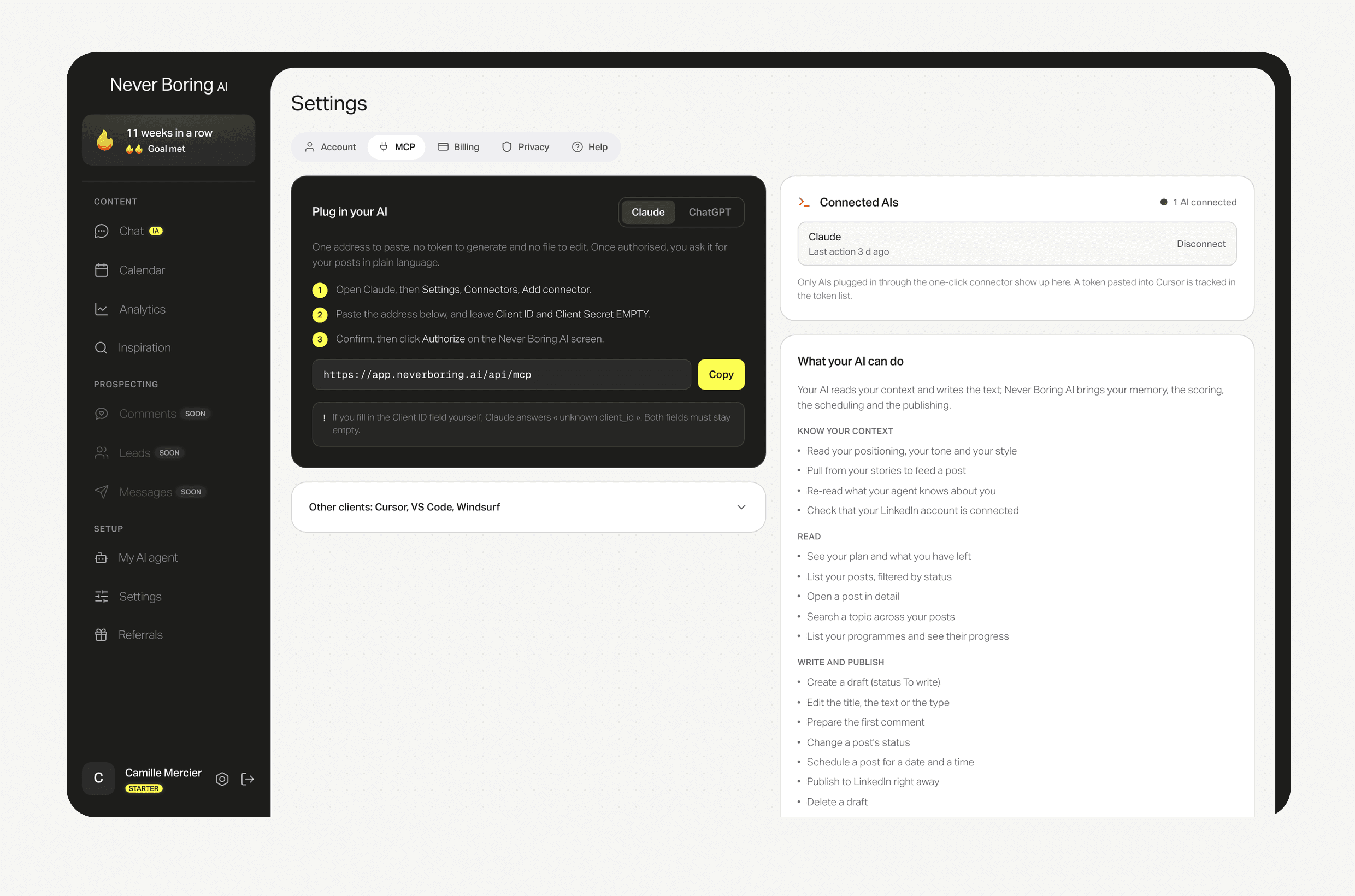
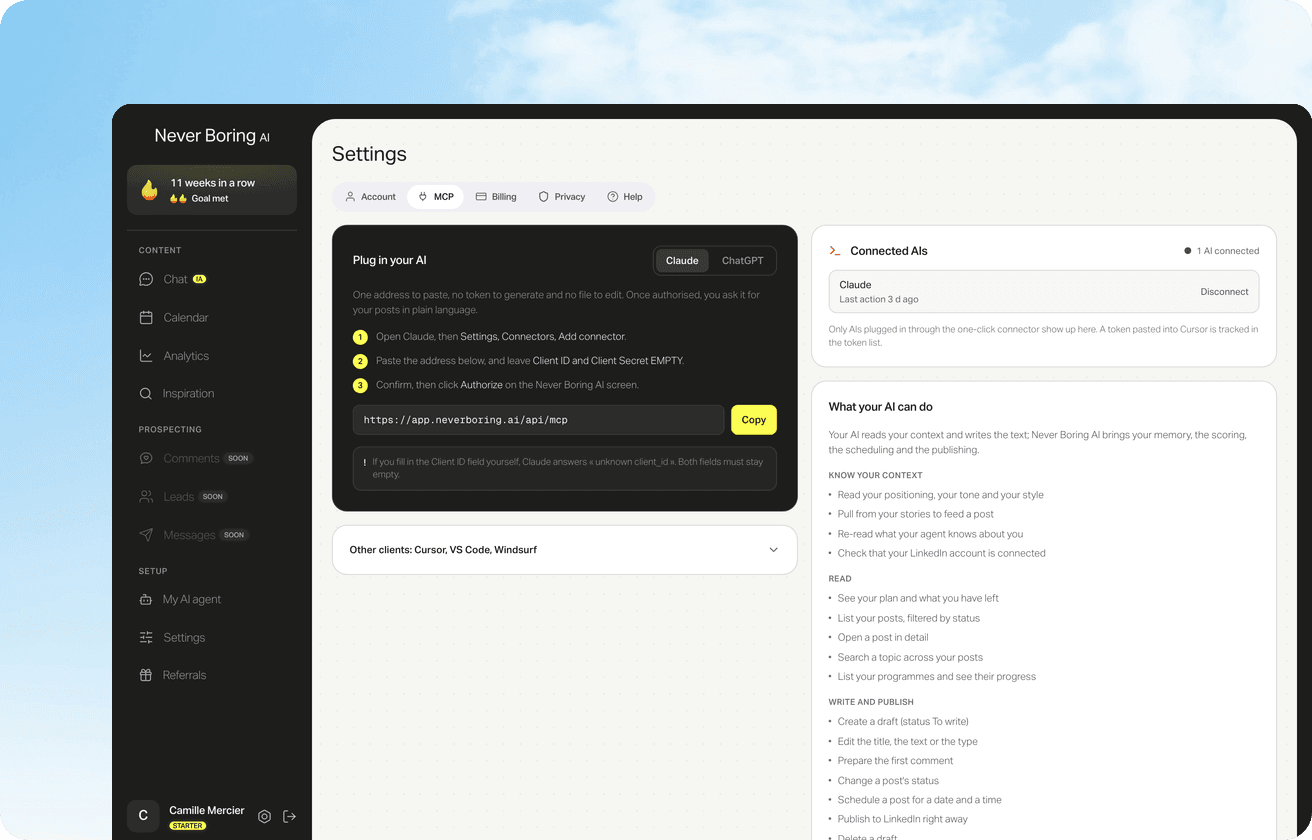
You paste the server address into Claude or ChatGPT, authorise from a consent screen, and it is plugged in. ChatGPT also asks you to turn on its Developer mode, one switch in its settings. You then see which AIs are plugged in and can unplug them at any time.
Other clients
Cursor, VS Code, Windsurf
Clients that accept a token connect with one line of configuration to copy. Claude and ChatGPT do not need one: an address is enough.
What your AI can do
It writes, Never Boring AI publishes
Nineteen actions: your AI writes the text, Never Boring AI brings the structure, the scheduling and the publishing.
Read
Your plan, your posts filtered by status, the detail of a post, your calendars.
Act
Create a draft, edit it, schedule it, delete it, publish it.
Under your control
Every connected AI shows up in your settings, and unplugs in one click.
The method
How to connect your AI to LinkedIn with MCP
MCP (Model Context Protocol) is a standard that lets an AI assistant use outside tools. Connected to Never Boring AI, it lets Claude, ChatGPT or Cursor read, write and schedule your LinkedIn posts without leaving the conversation. If you already think through ideas with an assistant, it removes the copy and paste between that conversation and your calendar. Here is how to set it up and use it well, step by step, from the first connection to everyday use.
1
Copy the server address
In your settings, the MCP tab shows the server address. In Claude or ChatGPT, you add it as a connector, then authorise access from a consent screen: no token to generate, no file to edit. ChatGPT also asks you to turn on its Developer mode. Cursor, VS Code and Windsurf connect with one line of configuration to copy. Once it is done, ask your assistant a simple question about your posts to confirm the connection works before you rely on it for anything that matters.
Connection
Add a connector, paste the address, authorise. You are plugged in.
2
Ask in plain language
Once connected, your AI understands ordinary requests. You can have it list your scheduled posts, read the detail of a post, look at your calendars or write a draft from the conversation you just had. It picks the action to use on its own, among those Never Boring AI opens to it. You do not need to learn any command: describe what you want as you would to a colleague, and add the dates or statuses that matter so it does not have to guess.
Request
List my posts scheduled for next week, and tell me if a day is missing.
3
Have it write, then schedule
The text is written by your AI, in the conversation, with all the context you gave it. Never Boring AI brings the rest: the draft filed in your calendar, the date, the time, the first comment and the publishing. Creating or editing a post through MCP consumes no generation from your subscription. This works best right after a long exchange, when the assistant already holds your reasoning, your examples and the wording you settled on together. Ask it to show you the draft text in the conversation first if you want one last read before it lands in your calendar.
Request
Turn our conversation into a 1,200 character post and schedule it for Thursday at 8 am.
4
Keep control of access
Every connected AI shows up in your settings, with the time of its last action. You unplug one in one click, and its tokens stop working immediately. A daily publishing cap also applies, so that a mistake by your assistant cannot flood your profile. It is a good habit to glance at that list from time to time, the same way you would review which apps can access your email.
Connected AIs
Claude: last action 2 hours ago. Unplug.
The pitfalls
What to avoid with a connected assistant
An AI connected to your account really acts. A few habits avoid unpleasant surprises, and none of them takes more than a minute. They are the same reflexes you would apply to any tool that can post in your name.
A request that is too vague
Avoid
Write a LinkedIn post.
Instead
Write a post about the migration we just finished, direct tone, 900 characters, with a question at the end.
Without context, your AI will write a generic text, connected or not. Specify the topic, the angle, the length and the ending you expect. Better still: ask it to write from the conversation you just had, where the material already is. Mention who the post is for, too: the same story told to clients and to peers does not end the same way.
Publishing without reading
Avoid
Write the post and publish it right away.
Instead
Write a draft, I will read it in the calendar, then schedule it.
An AI can get a name, a number or a tone wrong. Have it create a draft, read it in the editor with its LinkedIn preview, then schedule it. It takes a minute and saves you from publishing a mistake under your name. Keep direct publishing for posts you have already read in full, such as a draft you approved earlier in the conversation.
Leaving forgotten access open
Avoid
Three assistants connected six months ago, one of which you no longer use.
Instead
Only the AIs you actually use, checked now and then in your settings.
Every connected access is an open door to your account. Unplug the ones you no longer use: the list in your settings shows when each one last acted. A good moment to check is when you stop using an editor or an assistant: unplug it from your account the same day.
Running everything through the assistant
Avoid
Asking your AI to move every post, one by one, in conversation.
Instead
The conversation to write, the calendar to organise.
MCP is for writing where you already do your thinking. To reorganise a month of posts, a drag and drop in the calendar is still faster than a series of requests. Use each tool for what it does best. The same goes for reviewing a whole month: the calendar shows at a glance what a conversation has to describe line by line.
Rated 5/5 by its users
245 founders have already trusted Never Boring.
Translated from French.
Jonah ZehaniBrand, web and product designer
First off, congratulations Maxence. The work you did solo, and above all the quality of the app's design. That is something. Well done. (...)
Looking forward to seeing NeverBoring grow
FLFlorenceNever Boring AI user
A very efficient and relevant agent: barely any time spent setting it up. Quality posts with different angles. There are always a few tweaks left to match my style, and then it is good to go!
Louis MontagneFounder and CEO, ICONOKOM
Very cool so far, inteliigent post writing
GUGuillaumeNever Boring AI user
Great tool, smart agent!
An innovation in writing!
Will MariWeb designer
Super easy to use
Jonah ZehaniBrand, web and product designer
First off, congratulations Maxence. The work you did solo, and above all the quality of the app's design. That is something. Well done. (...)
Looking forward to seeing NeverBoring grow
Louis MontagneFounder and CEO, ICONOKOM
Very cool so far, inteliigent post writing
FLFlorenceNever Boring AI user
A very efficient and relevant agent: barely any time spent setting it up. Quality posts with different angles. There are always a few tweaks left to match my style, and then it is good to go!
Will MariWeb designer
Super easy to use
GUGuillaumeNever Boring AI user
Great tool, smart agent!
An innovation in writing!
GUGuillaumeNever Boring AI user
Great tool, smart agent!
An innovation in writing!
Will MariWeb designer
Super easy to use
Jonah ZehaniBrand, web and product designer
First off, congratulations Maxence. The work you did solo, and above all the quality of the app's design. That is something. Well done. (...)
Looking forward to seeing NeverBoring grow
FLFlorenceNever Boring AI user
A very efficient and relevant agent: barely any time spent setting it up. Quality posts with different angles. There are always a few tweaks left to match my style, and then it is good to go!
Louis MontagneFounder and CEO, ICONOKOM
Very cool so far, inteliigent post writing
FLFlorenceNever Boring AI user
A very efficient and relevant agent: barely any time spent setting it up. Quality posts with different angles. There are always a few tweaks left to match my style, and then it is good to go!
GUGuillaumeNever Boring AI user
Great tool, smart agent!
An innovation in writing!
Louis MontagneFounder and CEO, ICONOKOM
Very cool so far, inteliigent post writing
Will MariWeb designer
Super easy to use
Jonah ZehaniBrand, web and product designer
First off, congratulations Maxence. The work you did solo, and above all the quality of the app's design. That is something. Well done. (...)
Looking forward to seeing NeverBoring grow
FLFlorenceNever Boring AI user
A very efficient and relevant agent: barely any time spent setting it up. Quality posts with different angles. There are always a few tweaks left to match my style, and then it is good to go!
GUGuillaumeNever Boring AI user
Great tool, smart agent!
An innovation in writing!
Louis MontagneFounder and CEO, ICONOKOM
Very cool so far, inteliigent post writing
Will MariWeb designer
Super easy to use
Jonah ZehaniBrand, web and product designer
First off, congratulations Maxence. The work you did solo, and above all the quality of the app's design. That is something. Well done. (...)
Looking forward to seeing NeverBoring grow
A question before you start?
The questions that keep coming up about mcp access, and how we answer them.
A bridge between your AI assistant and your account. From Claude, ChatGPT or Cursor, you ask in plain language to list your posts, write one, schedule it or publish it: your agent does it inside your account.
Claude, ChatGPT, Cursor, VS Code and Windsurf. With Claude and ChatGPT there are no credentials to type: you paste the server address and authorise from a consent screen.
The text is written by your AI, not by ours: creating or editing a post through MCP costs no generation. Only the usual safety limits apply, including a daily publishing cap.
At any time, from your settings: you see which AIs are connected, when they last acted, and you disconnect the one you want in one click. Revoked tokens stop working immediately.
Yes, in both plans, as soon as you subscribe: MCP access opens at the first payment.
Your first content plan and your first 3 posts are on us
Create your account, no credit card needed, and walk away with your first post in minutes. Your LinkedIn calendar then runs on its own.