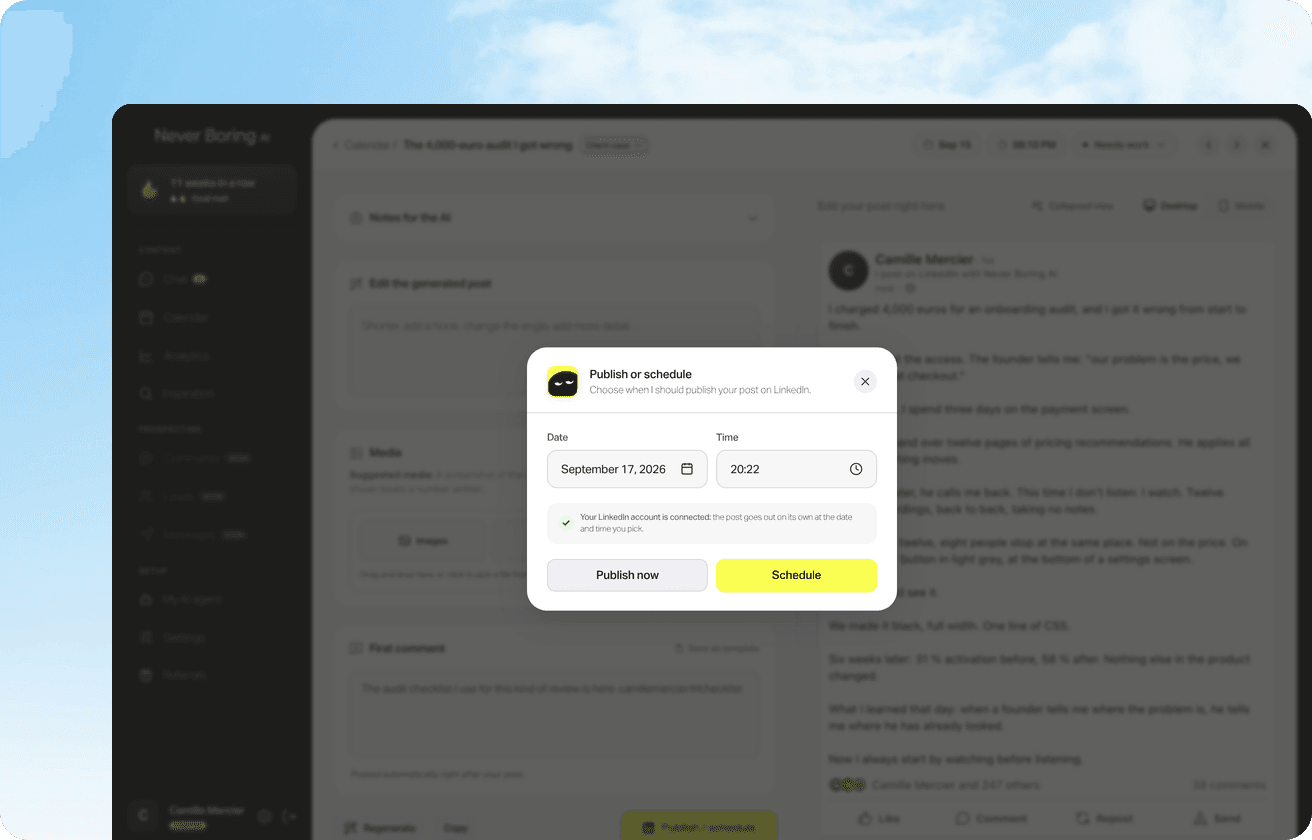
Direct answer: automatic publishing sends your post to LinkedIn at the scheduled date and time, with its first comment: through LinkedIn's official API on Starter, through a dedicated connection on Creator. You connect your account once, then the rest happens without you.
You choose the slot once and for all in your settings, and every post lines up with it. You can still change the time post by post.
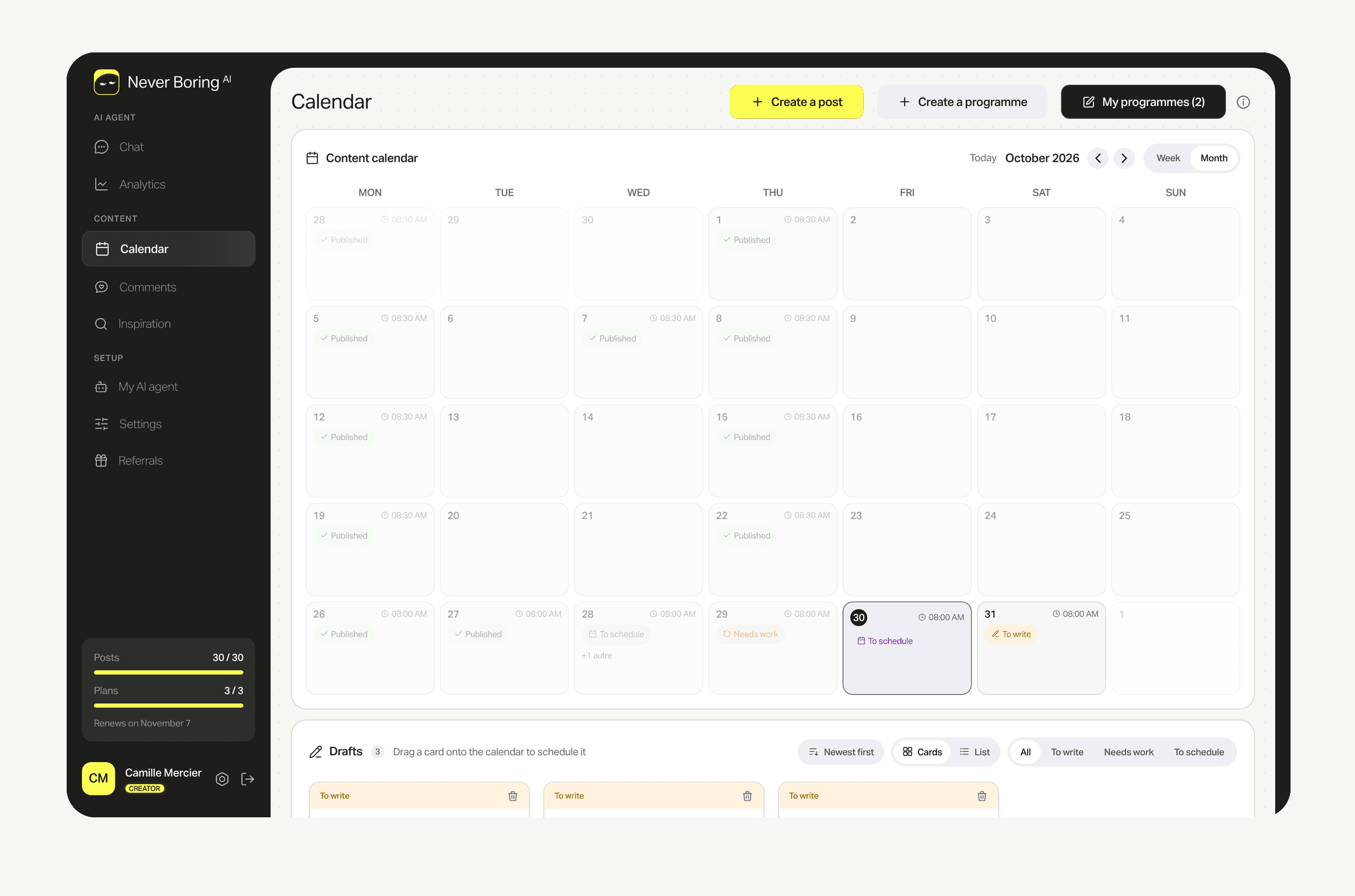
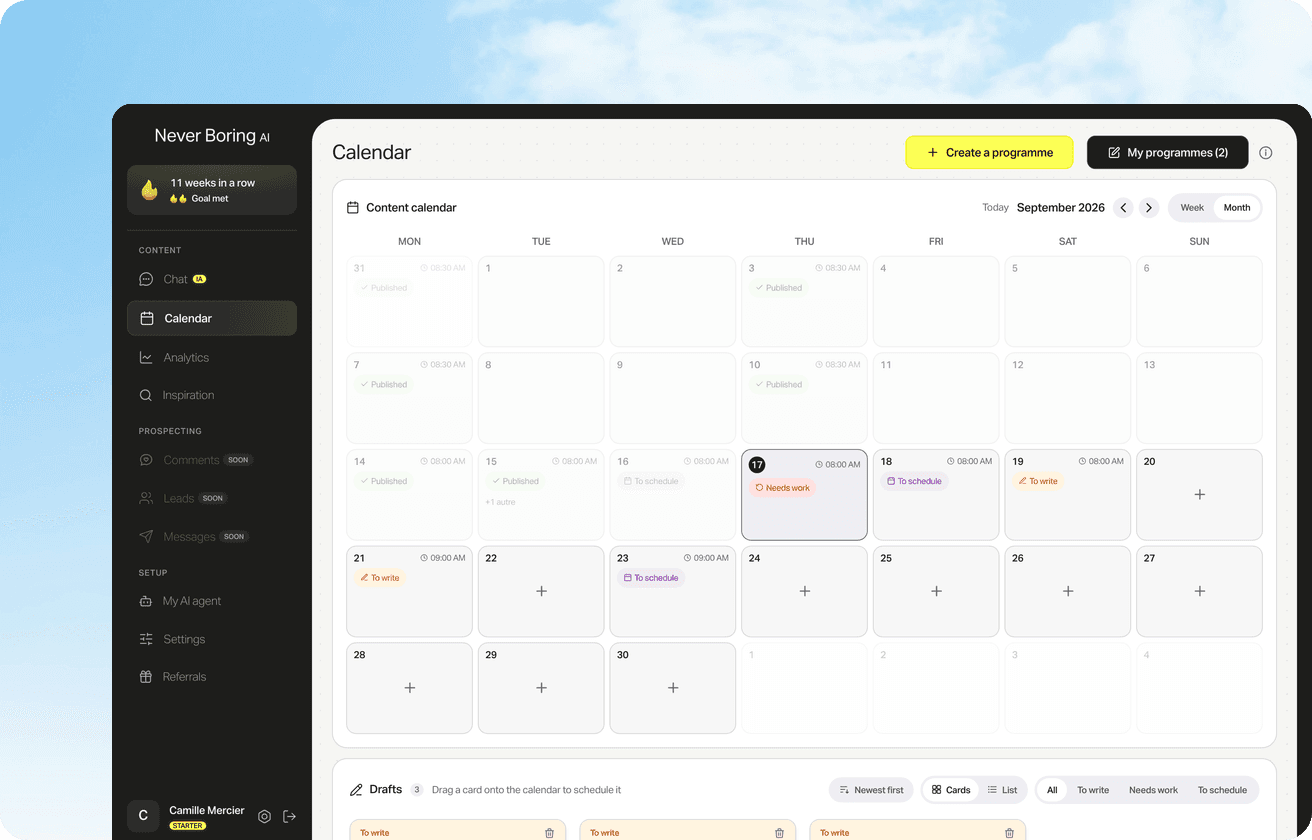
The calendar
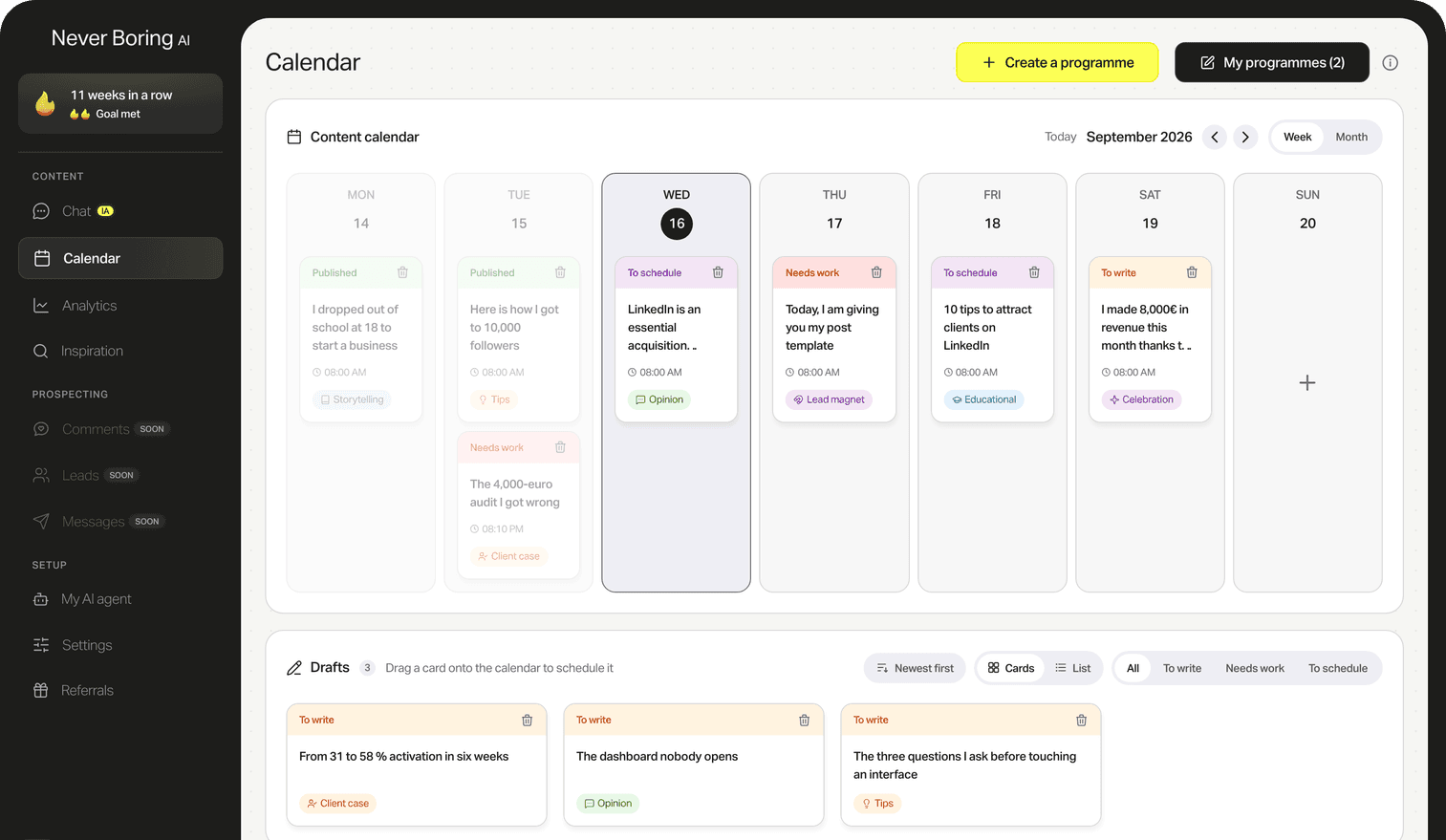
Your month fits on one screen
What is written, what is scheduled, what has gone out. A drag and drop is enough to move a post from one day to another.
Tags
Tag people and pages
On Creator, type @ in your post: Never Boring AI suggests the LinkedIn people and pages to mention, and the tag goes out with the post.
Publishing
It publishes while you work
You approve once. The rest goes out on its own, at the time you chose.
Automatic publishing
The post goes out to LinkedIn on the planned date and time. Nothing to reopen.
First comment
Your link goes in the comments, published right after, where LinkedIn does not penalise it.
Your time, not ours
You set your slot once in your settings. Every following post lines up with it.
The method
How to schedule a LinkedIn post, and when to publish it
Scheduling a LinkedIn post means preparing it fully in advance: text, visual, first comment and time. You write when you have time, it goes out when your audience is there. Here are the four steps so that nothing is left to do on the day, and so the day itself is spent answering comments rather than wrestling with uploads.
1
Connect your LinkedIn account once
Automatic publishing goes out from your own account, with the permission you grant when you connect it. You do it once, and you can withdraw that permission whenever you like from your settings. Nothing goes out unless you scheduled the post yourself, on the date and at the time you chose. Connecting early, before you need it, also means you will not be caught out the first time you want to schedule a post at the last minute.
Status
LinkedIn account connected. Next post: Tuesday at 8 am.
2
Prepare the whole post
A scheduled post should be complete when you approve it: text proofread, images, video or carousel document, mentions of the people and pages involved. Formats and sizes are checked when you drop the file in, not at publishing time: you find a problem while you still have time to fix it. Give the visual the same attention as the text, and check that any person or page you mention would be happy to be tagged in that post.
Media
Up to nine images, one video or one carousel document per post.
3
Put your link in the first comment
A link in the body of a post tends to reduce its reach, because it sends readers away from LinkedIn. The common practice is to put it in the first comment. You prepare it with the post, and it is published automatically right after it, without you having to come back to LinkedIn at the right moment to paste it. Add a short line before the link that says what people will find there: a bare address gets fewer clicks than one that comes with a reason to open it.
First comment
The full guide, with the templates to download, is here: link to the article.
4
Pick a slot and stick to it
The publishing time weighs less than the quality of the post, but consistency counts a lot. Weekday mornings are a good starting point for a professional audience, who come across the post as they start their day. Set your slot once in your settings, and change it post by post only when you have a specific reason. After a few weeks, your own numbers will tell you more about your audience than any general rule, so treat the starting slot as a hypothesis to test.
Slot
8 am, Monday to Friday. Exception: Thursday at 12:30 pm for the opinion post.
The pitfalls
What makes a scheduled post fall flat
Scheduling saves time, as long as you do not forget what happens after the post goes out. These four mistakes are easy to make precisely because the tool takes care of the rest.
Scheduling, then disappearing
Avoid
The post goes out at 8 am, and you only open LinkedIn in the evening.
Instead
You drop by to reply to the first comments within the hour.
Automatic publishing takes care of sending, not of the conversation. The first replies set the tone of the exchange and show your network you are there. Schedule your posts at a time when you can glance at LinkedIn shortly after.
Putting the link in the text
Avoid
Check out my new article: a link right in the middle of the post.
Instead
A post that stands on its own, and a link waiting in the first comment.
A post that sends people elsewhere from the second line gives them little reason to stay. Write a post that already delivers something, and offer the link in the comments to those who want to go further. If the link is the whole point of the post, say in the text what readers will find there, so the comment feels like the next step rather than an afterthought.
Publishing two posts too close together
Avoid
Two posts scheduled on the same day, an hour apart.
Instead
One post a day at most, and a month view to spot the traffic jams.
Two posts close together compete for the same audience. The month view shows at a glance what is scheduled, and a drag and drop is enough to move a post when two land too close. Spacing posts out also gives each one the time to collect its comments before the next one arrives.
Assuming a post went out without checking
Avoid
A tool that marks the post “published” even when sending failed.
Instead
A post that stays “Scheduled”, with the reason written out, until it has really gone out.
A post can fail: media rejected, permission expired. The worst part is not knowing. In Never Boring AI, a post is never marked published unless it was: the reason is shown, and it goes out at the next pass once the problem is fixed.
Rated 5/5 by its users
245 founders have already trusted Never Boring.
Translated from French.
Jonah ZehaniBrand, web and product designer
First off, congratulations Maxence. The work you did solo, and above all the quality of the app's design. That is something. Well done. (...)
Looking forward to seeing NeverBoring grow
FLFlorenceNever Boring AI user
A very efficient and relevant agent: barely any time spent setting it up. Quality posts with different angles. There are always a few tweaks left to match my style, and then it is good to go!
Louis MontagneFounder and CEO, ICONOKOM
Very cool so far, inteliigent post writing
GUGuillaumeNever Boring AI user
Great tool, smart agent!
An innovation in writing!
Will MariWeb designer
Super easy to use
Jonah ZehaniBrand, web and product designer
First off, congratulations Maxence. The work you did solo, and above all the quality of the app's design. That is something. Well done. (...)
Looking forward to seeing NeverBoring grow
Louis MontagneFounder and CEO, ICONOKOM
Very cool so far, inteliigent post writing
FLFlorenceNever Boring AI user
A very efficient and relevant agent: barely any time spent setting it up. Quality posts with different angles. There are always a few tweaks left to match my style, and then it is good to go!
Will MariWeb designer
Super easy to use
GUGuillaumeNever Boring AI user
Great tool, smart agent!
An innovation in writing!
GUGuillaumeNever Boring AI user
Great tool, smart agent!
An innovation in writing!
Will MariWeb designer
Super easy to use
Jonah ZehaniBrand, web and product designer
First off, congratulations Maxence. The work you did solo, and above all the quality of the app's design. That is something. Well done. (...)
Looking forward to seeing NeverBoring grow
FLFlorenceNever Boring AI user
A very efficient and relevant agent: barely any time spent setting it up. Quality posts with different angles. There are always a few tweaks left to match my style, and then it is good to go!
Louis MontagneFounder and CEO, ICONOKOM
Very cool so far, inteliigent post writing
FLFlorenceNever Boring AI user
A very efficient and relevant agent: barely any time spent setting it up. Quality posts with different angles. There are always a few tweaks left to match my style, and then it is good to go!
GUGuillaumeNever Boring AI user
Great tool, smart agent!
An innovation in writing!
Louis MontagneFounder and CEO, ICONOKOM
Very cool so far, inteliigent post writing
Will MariWeb designer
Super easy to use
Jonah ZehaniBrand, web and product designer
First off, congratulations Maxence. The work you did solo, and above all the quality of the app's design. That is something. Well done. (...)
Looking forward to seeing NeverBoring grow
FLFlorenceNever Boring AI user
A very efficient and relevant agent: barely any time spent setting it up. Quality posts with different angles. There are always a few tweaks left to match my style, and then it is good to go!
GUGuillaumeNever Boring AI user
Great tool, smart agent!
An innovation in writing!
Louis MontagneFounder and CEO, ICONOKOM
Very cool so far, inteliigent post writing
Will MariWeb designer
Super easy to use
Jonah ZehaniBrand, web and product designer
First off, congratulations Maxence. The work you did solo, and above all the quality of the app's design. That is something. Well done. (...)
Looking forward to seeing NeverBoring grow
A question before you start?
The questions that keep coming up about automatic linkedin publishing, and how we answer them.
From your account, with the permission you granted when connecting it, which you can withdraw at any time from your settings. Nothing goes out unless you scheduled the post.
We publish through the channel meant for it, which is the only thing we control. LinkedIn remains the sole judge of what it does with an account, based on its content and its frequency: nobody can honestly promise you otherwise.
Yes. You prepare the comment along with the post, and it is published automatically right after. That is the usual way to place a link without the post paying for it in reach.
The post stays in « Scheduled » with the reason written out, never marked as published. It goes out on its own at the next pass once the problem is fixed: nothing is lost and nothing is claimed.
Yes: up to nine images, one video or one carousel document per post. The accepted formats and sizes are LinkedIn's own, checked when you drop the file rather than at publishing time.
Your first content plan and your first 3 posts are on us
Create your account, no credit card needed, and walk away with your first post in minutes. Your LinkedIn calendar then runs on its own.