When the blank page wins, you start from a structure that has already proven itself. It fills up with your material and your settings, not with somebody else's text.
Story, tips, opinion, client case, behind the scenes, educational, lead magnet, celebration. You start from what you want to get, not from what you want to talk about.
The search
You look, you find
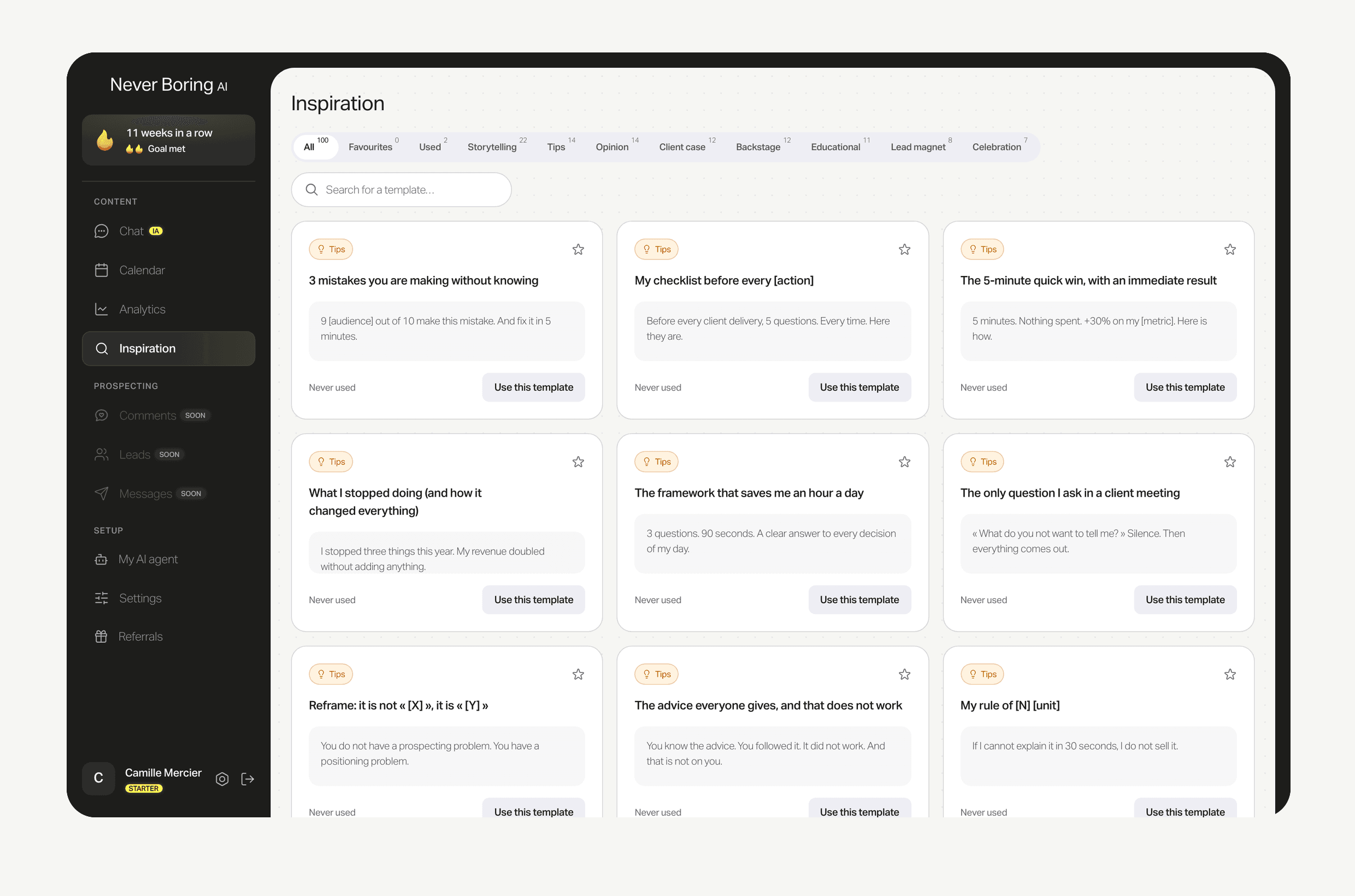
One word is enough to find the structure you had in mind. You favourite the ones that work for you and you see which ones you already used.
From template to post
One click and you are in the editor
The template gives the shape, your agent gives the substance. You never have to publish someone else's text.
Eight intents
Every template is filed under the post type it serves.
Instant search
One word, and the library narrows to what you are after.
Favourites and history
You find the ones you keep, and you see the ones you already used.
The method
How to use a LinkedIn post template without copying
A LinkedIn post template gives you a structure: where to start, how to build, how to end. Used well, it saves the hour spent in front of the blank page. Used badly, it produces posts everyone has already read. The difference lies almost entirely in what you put inside it. Here is how to use one.
1
Start from your intent
Before choosing a template, ask yourself what the post should achieve: tell a story, teach, take a stand, show a result or present an offer. The library is sorted by intent rather than by theme, because the same topic can become a story, a tutorial or an opinion. The intent decides the structure, not the topic. Naming the intent also helps you judge the finished post: a post meant to teach should leave the reader able to do something new, and a post meant to take a stand should be clear about which side you are on.
Intent
Take a stand: defend an idea that goes against the general view in my field.
2
Choose a structure that fits your material
A client case template needs a client, a problem and a result. A behind the scenes template needs a scene you lived. Choose the one you already have the material for, otherwise you will fill the boxes with generalities. Search by keyword, and favourite the structures that work for you. Over time, your favourites become a short personal toolkit: the handful of structures that suit the way you tell stories.
Template
Client case: the problem, what we tried, what worked, the number, the lesson.
3
Fill it with what you lived
The structure is shared, the content never is. Each box fills with a story, a number or a conviction that belongs to you. In one click, the template opens in the editor, and the agent fills it from your memory, with your style settings. Two people starting from the same template get two unrelated posts. The more stories your agent knows, the less it has to ask you before filling a template, so the time you spend telling it about your work pays off here too.
Filled template
The problem: one quote in two went unanswered. What worked: a ten-minute call before sending it.
4
Remove the traces of the template
Once the post is written, read it as a reader would: the frame should disappear behind the story. Remove transitions that smell of a formula, merge two parts if they say the same thing, change the order if your story calls for it. The template is a starting point, not a form to fill in box by box. A useful test: if someone who knows the template could not tell which one you used, you have done it well.
To remove
“Here is what I learned:” when the lesson is already clear on its own.
The pitfalls
Four ways to ruin a post built from a template
Templates are not the problem. The way people use them is. Each of these mistakes turns a useful shortcut into a post your audience has already seen somewhere else. Spot them early and the same template can serve you for months.
Copying a viral post
Avoid
Someone else's post, copied with three words changed.
Instead
The structure of the post, filled with your story.
Copying a text means telling a story that is not yours, and your audience always ends up noticing. Only the form can be reused: the order of ideas, the rhythm, the way it ends. The substance has to come from you. A useful exercise is to describe the viral post in one line of structure (hook, setback, turning point, lesson), then forget its words entirely before you write yours.
Always using the same template
Avoid
The same list format, every Tuesday for three months.
Instead
A mix of stories, opinions, client cases and behind the scenes.
A repeated format wears people out faster than a repeated topic. Vary the intents from one week to the next, and check in your history which templates you have used recently. A simple rule helps: never use the same template two weeks in a row, and make sure each month mixes at least three different intents.
Keeping the template's sentences
Avoid
Here are 3 lessons I learned (the third one will surprise you).
Instead
A hook written for your story, one that could not sit on top of anyone else's.
A template's sample sentences show the structure, they are not meant to be published. Left as they are, they make your post look like a hundred others. Rewrite at least the hook and the ending. Those two places are where readers decide to start and to reply, so they are also where generic wording costs you the most.
Choosing a template without the material
Avoid
A client case with no client, filled with vague results.
Instead
A template chosen because you already have the story that goes in it.
A template does not create the material it lacks. If you need to invent a number to fill a box, switch templates. Your agent would rather ask you a question than invent a result. Keeping a short list of the stories you have not told yet makes this easier: you pick the template after the story, not before.
Rated 5/5 by its users
245 founders have already trusted Never Boring.
Translated from French.
Jonah ZehaniBrand, web and product designer
First off, congratulations Maxence. The work you did solo, and above all the quality of the app's design. That is something. Well done. (...)
Looking forward to seeing NeverBoring grow
FLFlorenceNever Boring AI user
A very efficient and relevant agent: barely any time spent setting it up. Quality posts with different angles. There are always a few tweaks left to match my style, and then it is good to go!
Louis MontagneFounder and CEO, ICONOKOM
Very cool so far, inteliigent post writing
GUGuillaumeNever Boring AI user
Great tool, smart agent!
An innovation in writing!
Will MariWeb designer
Super easy to use
Jonah ZehaniBrand, web and product designer
First off, congratulations Maxence. The work you did solo, and above all the quality of the app's design. That is something. Well done. (...)
Looking forward to seeing NeverBoring grow
Louis MontagneFounder and CEO, ICONOKOM
Very cool so far, inteliigent post writing
FLFlorenceNever Boring AI user
A very efficient and relevant agent: barely any time spent setting it up. Quality posts with different angles. There are always a few tweaks left to match my style, and then it is good to go!
Will MariWeb designer
Super easy to use
GUGuillaumeNever Boring AI user
Great tool, smart agent!
An innovation in writing!
GUGuillaumeNever Boring AI user
Great tool, smart agent!
An innovation in writing!
Will MariWeb designer
Super easy to use
Jonah ZehaniBrand, web and product designer
First off, congratulations Maxence. The work you did solo, and above all the quality of the app's design. That is something. Well done. (...)
Looking forward to seeing NeverBoring grow
FLFlorenceNever Boring AI user
A very efficient and relevant agent: barely any time spent setting it up. Quality posts with different angles. There are always a few tweaks left to match my style, and then it is good to go!
Louis MontagneFounder and CEO, ICONOKOM
Very cool so far, inteliigent post writing
FLFlorenceNever Boring AI user
A very efficient and relevant agent: barely any time spent setting it up. Quality posts with different angles. There are always a few tweaks left to match my style, and then it is good to go!
GUGuillaumeNever Boring AI user
Great tool, smart agent!
An innovation in writing!
Louis MontagneFounder and CEO, ICONOKOM
Very cool so far, inteliigent post writing
Will MariWeb designer
Super easy to use
Jonah ZehaniBrand, web and product designer
First off, congratulations Maxence. The work you did solo, and above all the quality of the app's design. That is something. Well done. (...)
Looking forward to seeing NeverBoring grow
FLFlorenceNever Boring AI user
A very efficient and relevant agent: barely any time spent setting it up. Quality posts with different angles. There are always a few tweaks left to match my style, and then it is good to go!
GUGuillaumeNever Boring AI user
Great tool, smart agent!
An innovation in writing!
Louis MontagneFounder and CEO, ICONOKOM
Very cool so far, inteliigent post writing
Will MariWeb designer
Super easy to use
Jonah ZehaniBrand, web and product designer
First off, congratulations Maxence. The work you did solo, and above all the quality of the app's design. That is something. Well done. (...)
Looking forward to seeing NeverBoring grow
A question before you start?
The questions that keep coming up about template library, and how we answer them.
To break the blank page. Each one gives a proven structure: where to start, how to build, how to end. You pick the one that fits your topic, and your agent fills it with what you have lived.
The structure is shared, the content is not. The template gives a frame; what fills it comes from your stories, your numbers and your style. Two people starting from the same template get two unrelated posts.
About a hundred, sorted by intent: telling, teaching, taking a stand, showing a result, presenting an offer. You can favourite the ones that work for you and find them again in one click.
From the LinkedIn writing rules the product applies everywhere, and from what we measure on a corpus of real posts. They change when the measurements change, not when a trend passes.
Of course. The template is only a starting point: once the post is open in the editor, you rewrite it like any other.
Your first content plan and your first 3 posts are on us
Create your account, no credit card needed, and walk away with your first post in minutes. Your LinkedIn calendar then runs on its own.